
Starting a faceless YouTube channel in 2026 takes an afternoon, not a film degree. The camera, the editing suite, the voice recording booth — all of it has been replaced by AI tools that turn a topic into a finished video. What still matters is doing the steps in the right order, with a clear reason behind each decision.
This is the complete step-by-step process, from empty Google account to first published video, with enough detail to skip the trial-and-error phase most creators waste their first three months on.
Step 1: Pick a Niche Using Data, Not Instinct
Most failed faceless channels die at this step. They pick a niche because it sounds interesting or because they think they know a lot about it. Neither of those is a business reason.
The signal you're looking for is outlier performance: a small channel with one or two videos that got far more views than its subscriber count would predict. A 12,000-subscriber channel with a 1.8M-view video tells you the format and topic combination is in demand independent of audience size. That's the kind of evidence worth building on. A 4M-subscriber channel with a 600K-view video tells you nothing useful.
Start by listing 4–6 candidate niches. Good hunting grounds for faceless formats include:
- History (wars, disasters, unsolved mysteries, forgotten empires)
- Personal finance and economics (credit, investing, inflation explainers)
- True crime and dark psychology
- Health and disease explainers
- Stoic philosophy and life advice
- Sports history and athlete biographies
- Geopolitics and current events
- Motivational and self-improvement Shorts
For each candidate, go to YouTube, search the main topic, sort by view count, and click through the top 5–10 videos to check the channel size. You're looking for the mismatch: big views, small channel.
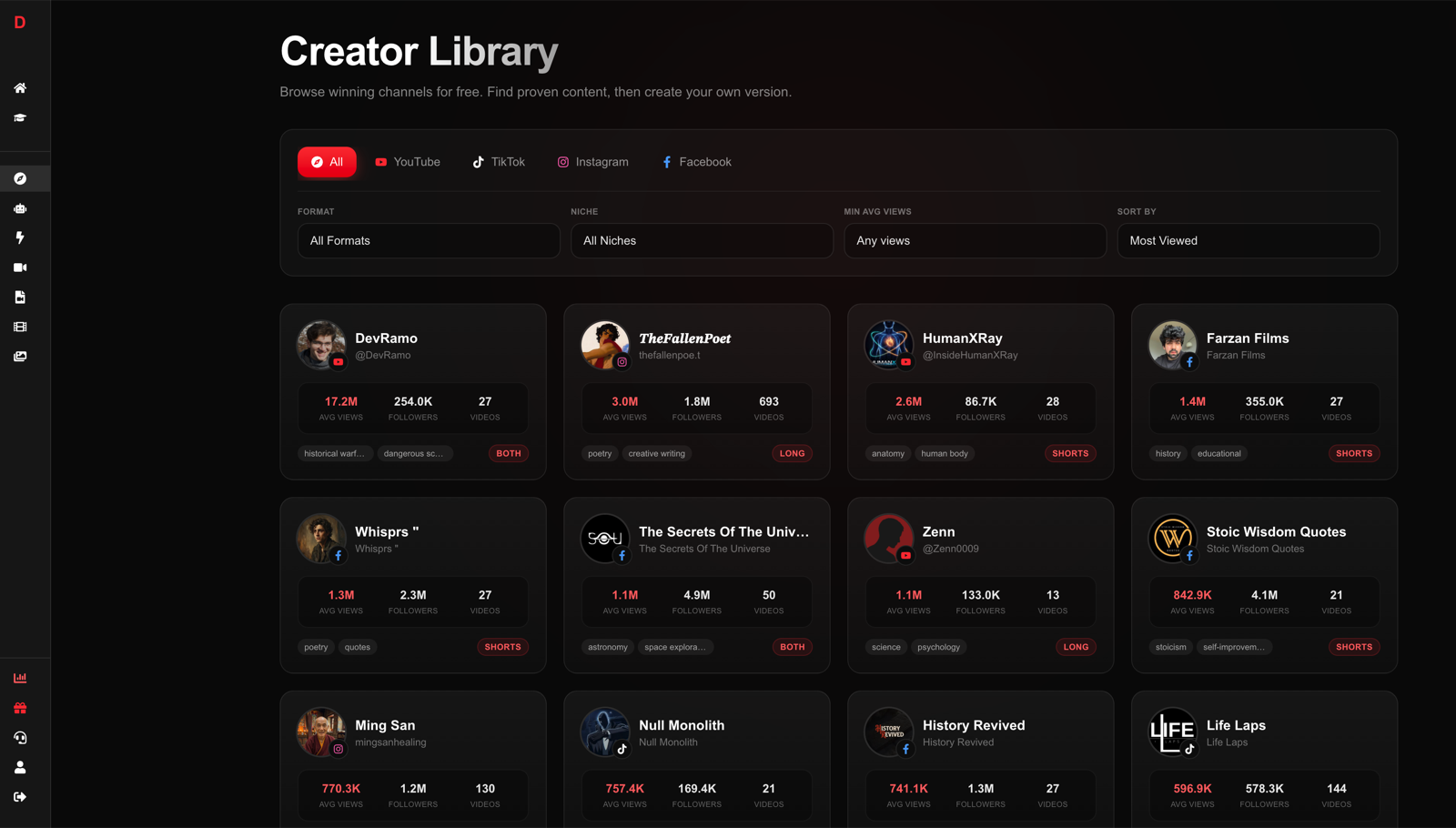
You can do this manually, but it's slow. DirectAI's Creator Library does it automatically: it indexes winning faceless channels across YouTube, TikTok, Instagram, and Facebook, filters by niche, sorts by views, and flags each channel's viral outlier videos:
Once you land on a niche, verify two more things before committing:
- Posting longevity: Can you produce 100+ video topics in this niche without exhausting the well? History and psychology have near-infinite supply. "Reviews of one specific product category" does not.
- Monetization upside: Ad-friendly niches (finance, health, education) earn higher CPMs than entertainment-only niches. A finance channel running at $15–30 CPM earns very differently from a meme commentary channel at $2–4 CPM, even with identical view counts.
For more niche inspiration grounded in what actually earns, read 50+ faceless YouTube channel ideas that make money.
Step 2: Set Up the Channel the Right Way
This is mechanical but worth doing once correctly instead of fixing later.
Account structure: Create a dedicated Google account for the channel. Mixing it with a personal Gmail account creates headaches with YouTube Studio permissions, AdSense linking, and if you ever want to bring in a collaborator. Fifteen minutes now saves hours later.
Channel name: Short, niche-specific, easy to pronounce, easy to remember. "Vault History" beats "HistoryStoriesWithJamesOrWhoeverThisIs." Avoid your real name entirely: faceless channels grow on topic identity, not personality. Once you name it, check that the same handle is available on Instagram and TikTok even if you don't plan to use them immediately — cross-platform consistency matters when you scale.
Channel art: Your banner and profile icon do two things: signal professionalism and reinforce the niche. A clean text-based logo in a bold font on a dark background works fine. You don't need a graphic designer. Free AI image tools (or even Canva) get this done in 20 minutes. Keep it simple: the video grid is your real storefront, not the banner.
Channel description: Write two to three sentences. Put the primary keyword in the first sentence. Make it about what the viewer gets, not about you. "Untold history stories, published every week. From forgotten empires to catastrophic financial collapses." That's it.
YouTube Studio settings:
- Set channel keywords in Settings → Channel → Basic Info
- Set your country for accurate analytics
- Enable two-step verification immediately — channel theft is real
Step 3: Lock Your Format Before Producing Anything
This is the step most new channels skip, and it's why their first 20 videos feel inconsistent.
Your format is the invisible structure that makes your channel feel like a channel rather than a collection of random videos. Once viewers recognize the format, they know what to expect, and expectation is what drives the subscribe button.
Decide these elements before you make video one:
Length and platform:
| Format | Typical Length | Monetization Path | Posting Cadence |
|---|---|---|---|
| YouTube Shorts | Under 60 seconds | Shorts Fund + RPM share | 1 per day |
| Long-form YouTube | 8–15 minutes | YPP ads, sponsors | 2–3 per week |
| TikTok vertical | 30–90 seconds | Creator Rewards | 1–2 per day |
| Long + Short hybrid | Both | Dual streams | Weekly long + daily clips |
Voice: Pick one AI voice and commit to it. The voice is your brand signature. Viewers who come back from one video to the next will notice if it changes, and subconsciously it erodes trust. DirectAI offers 30+ voices in 12 languages, so take 15 minutes to test several on the same script before you settle. A calm, documentary-style male voice fits history. A cleaner, faster voice fits finance. A warm, measured voice fits personal growth.
Visual style:
- Cinematic AI-generated imagery (works for history, mythology, dark topics)
- Documentary stock footage (works for current events, economics)
- Animated infographics (works for data-heavy or educational content)
- A consistent mix (most channels use this)
Script structure: Every video should follow the same skeleton:
- Hook: first 3 seconds, one sentence that creates a question in the viewer's mind
- Premise: what this video is actually about (15–30 seconds)
- Main payload: the story, explanation, or argument
- Payoff or takeaway: why it mattered or what to do with it
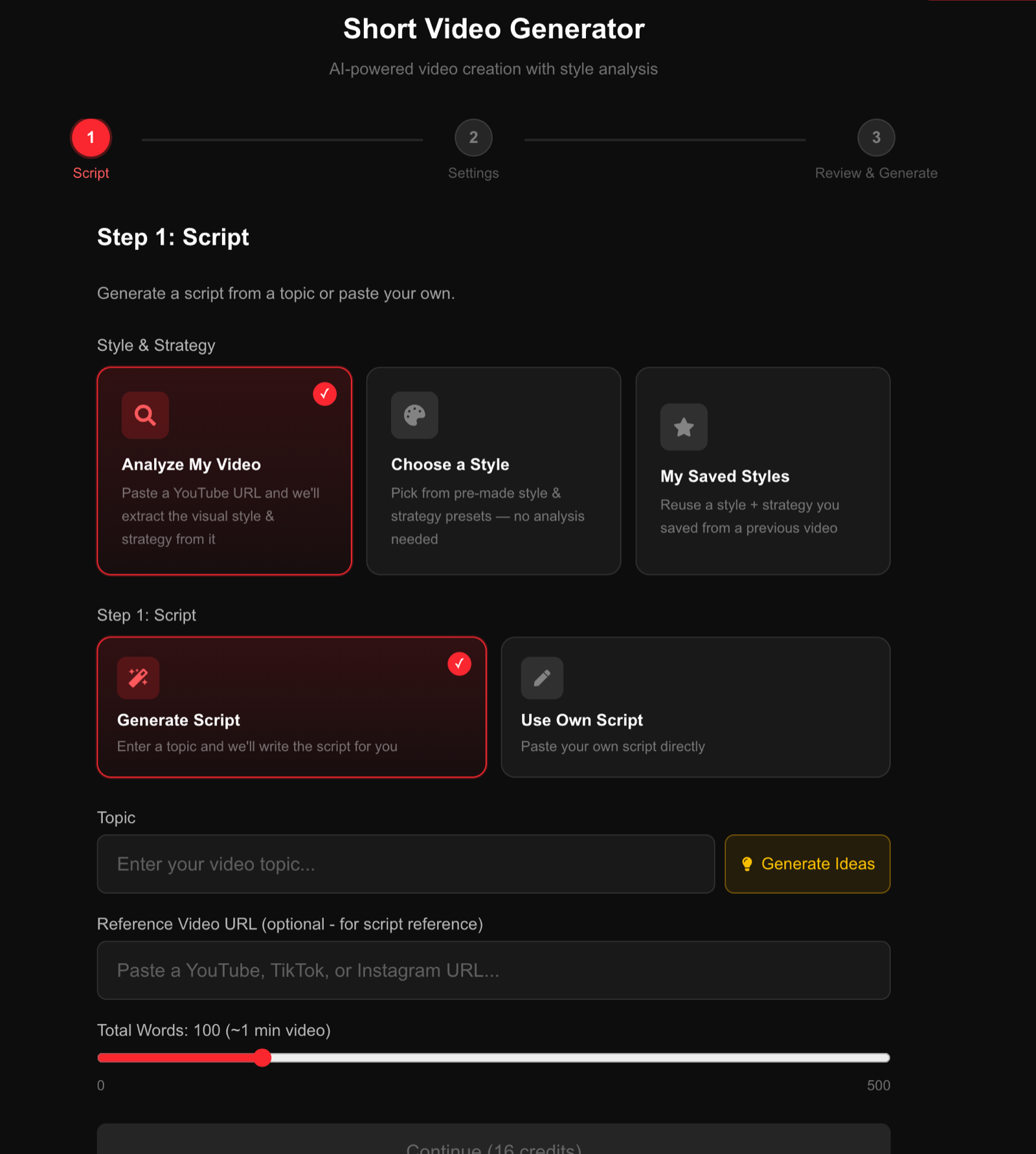
Don't invent this structure from scratch. Find one proven video in your niche that overperformed, and reverse-engineer its structure. DirectAI's video generator has a built-in "Analyze My Video" feature: paste the URL of any YouTube, TikTok, or Instagram video and it extracts the visual style and content strategy, then clones it onto whatever topic you choose:
For a deeper look at how to build the right content format for your niche, see types of content creation.
Step 4: Produce Your First Batch of Videos
Don't publish one video and wait to see what happens. The algorithm needs a body of content to figure out who you are and what audience to serve you to. Produce a batch of 5–10 videos before you publish anything.
The modern faceless video production flow:
- Topic ideation (use the Creator Library to find what's already working in your niche, or use DirectAI's idea generator)
- Script generation (AI writes it based on your topic and style preset, or you write and paste your own)
- Voice and settings (choose voice, video format, language)
- Auto-assembly (AI generates voiceover, selects visuals, adds captions and music, renders)
- Review and adjust in the editor (swap clips, rewrite lines, change caption style, pick music)
- Export and upload
The end-to-end process in DirectAI takes about 3 minutes per video. Producing a full week of content takes one sitting:
Here's an example of a finished faceless video produced end-to-end with the AI pipeline:
A word on quality: YouTube's spam filters and monetization reviewers are looking for videos with genuine informational value, consistent format, and original scripting. AI-generated does not mean low quality — it means efficient production. Write or generate unique scripts per video. Don't copy paste someone else's script into a generator and call it done. Add a perspective, a framing angle, a detail the other videos missed.
Launch your channel this week
DirectAI turns a topic into a finished faceless video — script, voiceover, visuals, captions, music — in about 3 minutes. No camera, no editing skills required.
Create your first video →Step 5: Title, Thumbnail, and Metadata — The Discoverability Layer
A great video with a weak title is an invisible video. Search and browse discovery on YouTube is driven by clicks, and clicks are driven by titles and thumbnails. This deserves more attention than most tutorials give it.
Title formulas that work for faceless content:
- Specificity with stakes: "The Bank That Collapsed in 48 Hours and Wiped Out $40 Billion"
- Curiosity gap: "The Roman Strategy That No Army Figured Out for 300 Years"
- Reversal: "Why the Richest Man in History Died Broke"
- Number + outcome: "3 Financial Decisions That Destroyed the Roman Empire"
Avoid generic titles like "The Fall of Rome Explained" — they compete with 10,000 videos and give the viewer no reason to choose yours.
Thumbnail for long-form videos:
- One high-contrast focal image
- Four words of text maximum, large enough to read on a phone
- No clutter, no collages, no tiny text
- Your visual style should match the tone of the channel (dark and dramatic for history/crime, clean and minimal for finance, warm for personal growth)
For Shorts: YouTube auto-generates thumbnails from the video frame. Make sure the first visible frame after the hook text is visually strong.
Description: Write two to three sentences summarizing the video with the main keyword in the first line. Add timestamps for long-form (this improves watch time by letting viewers navigate). Add any affiliate links with disclosure. Don't stuff it with tags and keyword spam — it doesn't help and looks unprofessional.
Tags: Add 8–12 relevant tags. They're a minor ranking factor, but they're free and take two minutes.
Step 6: Post Consistently in the First 30 Days
The algorithm is learning during your first 30 days: who clicks your videos, how long they watch, whether they subscribe, whether they come back. The more signals you give it, the faster it calibrates. Inconsistent posting breaks the learning loop.
Practical posting schedules:
| Channel Type | First 30 Days Goal | After 90 Days |
|---|---|---|
| Shorts-only | 30 videos (1/day) | 60–90 videos |
| Long-form only | 12 videos (3/week) | 36–48 videos |
| Hybrid | 20 Shorts + 6 long-form | Scale both |
One thing to accept early: the first 10–20 videos probably won't perform well. That's normal and expected. The algorithm doesn't know who you are yet, and you're still refining your format. Judge nothing until you have 30 uploads.
What you should be tracking from day one:
- Click-through rate (CTR): benchmark is 4–8% for most niches. Below 3% means your title or thumbnail is the problem.
- Average view duration (AVD): for Shorts, aim for 75%+ loop completion. For long-form, aim for 40–50% of total length.
- Subscriber-to-view ratio: if 1–3% of viewers subscribe, your content is connecting. Below 0.5%, the video isn't creating enough desire for more.
Don't change your niche or format based on early numbers. Give the niche 30–50 uploads of consistent quality before drawing any conclusions.
Step 7: Build Toward Monetization with a Clear Path
Understanding the monetization timeline before you start stops you from getting discouraged at month two.
YouTube Partner Program requirements (2026):
| Path | Requirement | What You Unlock |
|---|---|---|
| Long-form | 1,000 subs + 4,000 watch hours | Ad revenue + channel memberships |
| Shorts | 1,000 subs + 10M Shorts views in 90 days | Shorts ad revenue |
Realistic timeline with consistent posting: 2–5 months for long-form channels in engaging niches, faster for Shorts-heavy channels that catch an outlier video early.
Revenue before YPP: You don't have to wait for monetization to start earning. From video one, you can:
- Add affiliate links in descriptions (Amazon Associates, finance tools, software referrals)
- Promote a newsletter or lead magnet and sell a course or consultation behind it
- Dropship or promote products that match the niche
Revenue stacking after YPP: Most established faceless channels run three to four streams simultaneously:
- YouTube ad revenue (CPM varies by niche: $2–5 for entertainment, $8–20 for personal finance, $15–35 for insurance or legal topics)
- Affiliate commissions (often matches or exceeds ad revenue in high-CPM niches)
- Brand sponsorships (typically $500–5,000 per integration at 50K–200K subscribers in niche categories)
- Digital products or community memberships
The niche you pick in Step 1 determines your CPM ceiling. That's why data-driven niche selection is worth the extra time.
Step 8: Iterate Based on What the Data Shows
After 30 uploads, you have enough data to make real decisions. Here's how to read it:
One video significantly outperforms the others: Look at what's different. Was the topic more emotionally charged? Was the title more specific? Was the hook more aggressive? Clone the approach — not the topic, the structure and angle — in the next five videos.
All videos have low CTR: The problem is titles and thumbnails, not the content. Don't change the niche. Change the visual style of thumbnails and the title formula.
Good CTR but low AVD: Viewers are clicking but leaving early. The hook is working but the first 60 seconds of the video aren't delivering on the title's promise. Rewrite your opening structure.
Low CTR and low AVD: Both the packaging and the content need work. At this point, revisit Step 3 and look more carefully at what the winning channels in your niche are actually doing differently.
This iteration cycle is faster when you can produce and test videos quickly. A channel that can turn out a new video in 3 minutes can run a test in an afternoon. A channel spending 8 hours on each video tests maybe twice a month.
For a deeper breakdown of short-form optimization across platforms, read short form video content strategy.
FAQ
How long does it actually take to start a faceless YouTube channel? The channel setup takes under an hour. The first video takes 3–20 minutes depending on your production method. The real time investment is the learning curve on niching correctly and optimizing titles, which takes the first 30 uploads to work through.
Do I need to show my face or use my own voice? Neither. AI voiceovers have reached the point where most viewers can't identify them as synthetic, and faceless visual content (AI imagery, stock footage, text overlays) is the standard format for hundreds of high-earning channels.
Can YouTube tell if a video was made with AI? YouTube doesn't penalize AI-assisted production. It does penalize mass-produced spam with no original value. The line is not AI vs. human, it's original and useful vs. scraped and generic.
How many videos before the channel gains traction? Plan for 30–50 videos before expecting meaningful organic reach. Some channels hit an outlier video at video 12; others take 80 uploads. The variable is mostly niche competition and how well the format is refined.
What's the most common reason faceless channels fail? Niche-hopping. Changing format or topic every few weeks resets the algorithm's understanding of who the audience is. Pick a niche with evidence behind it, lock the format, and post consistently for at least 60 days before evaluating results.