The Best YouTube Automation Tools in 2026
YouTube automation tools cover a wide range of tasks: writing scripts, generating voiceovers, creating visuals, making thumbnails, scheduling uploads, and analyzing what's working. The problem most creators run into is that each tool solves one piece of the puzzle, which means you end up managing five or six subscriptions and stitching everything together manually.
This guide breaks down the best options by category, notes where each one fits in the workflow, and is honest about where they fall short.
What "YouTube Automation" Actually Covers
Before comparing tools, it helps to be clear about what the term includes. A full faceless channel pipeline has roughly five stages:
- Research — finding topics and formats with proven demand
- Scripting — writing a structured, watch-time-optimized script
- Voiceover — generating or recording audio narration
- Video production — sourcing or generating visuals, adding captions and music
- Publishing and optimization — thumbnails, titles, tags, scheduling
Most tools specialize in one or two of these stages. A few try to do all of them.
Tools by Category
Research and Topic Discovery
1. TubeBuddy TubeBuddy is a browser extension that sits inside YouTube Studio. It scores keyword competition, suggests tags, and shows you what's ranking in your niche. The free tier gives basic data; the paid tiers ($5–$50/month depending on channel size) unlock deeper keyword research and A/B thumbnail testing. It works, but it only tells you what's already ranking — it doesn't show you what formats and styles are pulling views on other channels.
2. VidIQ Similar to TubeBuddy with overlapping features. VidIQ's main differentiator is its daily ideas feed, which surfaces trending topics based on your channel's niche. Pricing starts around $10/month. Worth testing alongside TubeBuddy on a free trial to see which interface you prefer. Neither tool helps with production.
3. DirectAI Creator Library This one sits in a different category from the two above. Instead of keyword scores, it tracks winning faceless channels across YouTube, TikTok, Instagram, and Facebook, then flags viral outliers automatically. You can filter by niche, sort by average views, and when you find a video you want to replicate, hit "Create Similar" to clone the format onto a new topic.
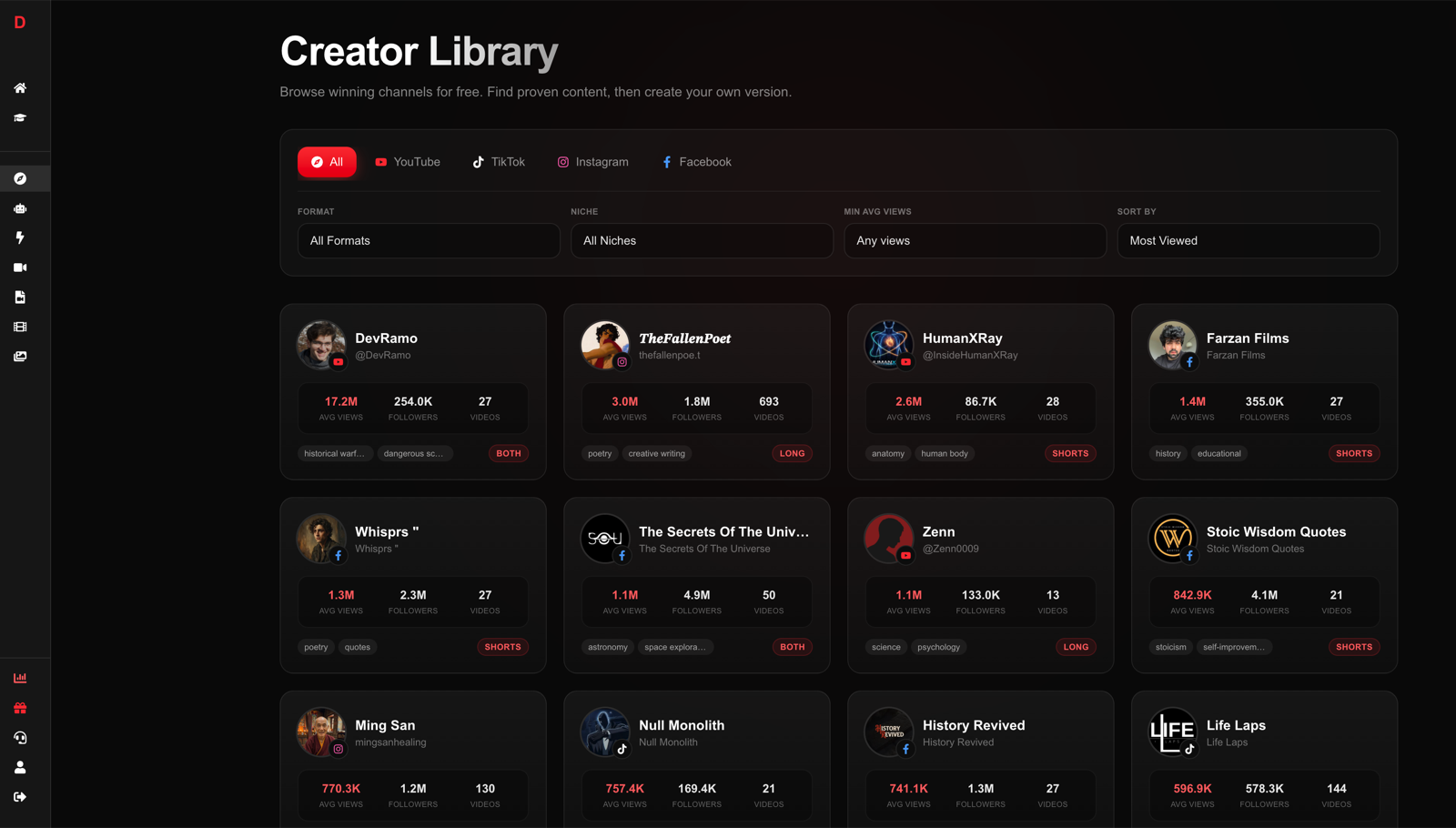
For automation-focused creators, this is more actionable than keyword scores because you're seeing proven video formats, not just search volume.
Scripting
4. ChatGPT / Claude Both are capable of writing YouTube scripts, and both are free at the base tier. The limitation is that you have to prompt carefully to get a structured, hook-first script that actually retains viewers. Writing a strong YouTube script takes a specific format — cold open, body with pattern interrupts, clear CTA — and a general-purpose LLM needs precise instructions to hit that structure consistently. Expect several revision rounds per script.
5. Jasper Jasper is a marketing-focused AI writer with YouTube-specific templates. It's more guided than ChatGPT for non-technical users, but at $39/month for the entry plan, it's expensive for what amounts to a prompted LLM with a cleaner interface. It does not handle video production.
Voiceover
6. ElevenLabs The current benchmark for AI voice quality. ElevenLabs offers voice cloning and a large library of realistic voices. The free plan gives about 10,000 characters per month; paid plans start at $5/month. Audio quality is excellent. The workflow friction is that you paste in text, export the audio file, and then sync it with video in a separate editor. For a complete AI voiceover workflow, this is a reliable choice, but it's one more tool to manage.
7. Murf Murf is a voiceover platform aimed at business users, with a built-in editor that syncs voice to slide-style visuals. It offers 120+ voices across 20 languages. Pricing starts at $19/month. It's polished but not designed for high-volume YouTube automation; the video output looks more like a presentation than a YouTube video.
Video Production
8. Pictory Pictory takes a script or URL and assembles a video from stock footage. The results are adequate for talking-head style explainers where you just need B-roll behind a narration. Pricing starts at $19/month. The stock footage library is large but not always a precise match for specialized topics. You'll spend time manually swapping clips.
9. InVideo AI InVideo AI has a similar approach to Pictory with a more refined AI assistant that lets you iterate by typing instructions ("make the intro faster," "change the background music"). It's genuinely easier to use than most competitors, and the output quality for faceless YouTube content is reasonable. Plans start at $20/month. Like Pictory, it does not handle scripting or research — you bring your own script.
All-in-One Pipeline
10. DirectAI DirectAI is built specifically for the faceless video pipeline. You enter a topic, select a style (or paste a YouTube/TikTok/Instagram URL to extract the style from a video you want to emulate), and the platform generates a complete video: script, voiceover in 30+ voices across 12 languages, synced visuals, captions, and background music. The process takes about 3 minutes per video.
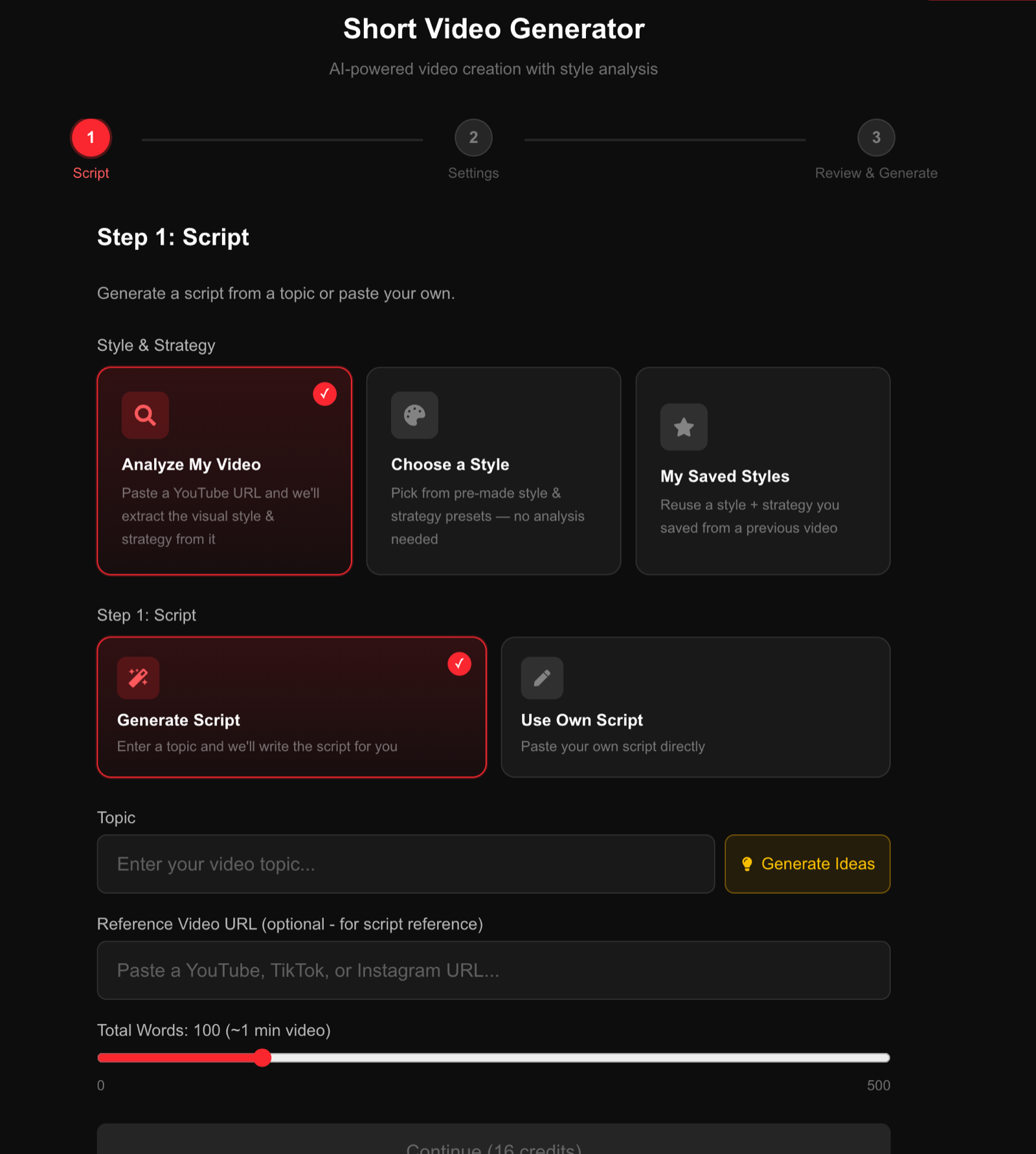
The practical advantage over mixing individual tools is throughput. If you're running a YouTube automation channel targeting daily or near-daily uploads, cutting production time from hours to minutes per video changes what's operationally feasible.
Turn any topic into a complete faceless video in 3 minutes
Script, voiceover, visuals, captions, and music — generated together, not stitched from five different tools.
Try DirectAI Free →Side-by-Side Comparison
| Tool | Category | Starting Price | Handles Full Pipeline |
|---|---|---|---|
| TubeBuddy | Research / SEO | Free / $5+ | No |
| VidIQ | Research / SEO | Free / $10+ | No |
| DirectAI Creator Library | Research / Format Intel | Included with DirectAI | No (pairs with generator) |
| ChatGPT | Scripting | Free / $20 | No |
| Jasper | Scripting | $39+ | No |
| ElevenLabs | Voiceover | Free / $5+ | No |
| Murf | Voiceover | $19+ | No |
| Pictory | Video Production | $19+ | No |
| InVideo AI | Video Production | $20+ | No |
| DirectAI | Full Pipeline | Free trial available | Yes |
How to Choose
The right stack depends on your situation:
- If you're testing the model before committing time or money, use free tiers of ChatGPT for scripting, ElevenLabs for voice, and a free video editor. Slow and manual, but zero cost to validate.
- If you want moderate control with separate tools, combine VidIQ for research, ElevenLabs for voice quality, and InVideo AI for video assembly. Budget around $40–$50/month for the stack.
- If you're optimizing for volume, an all-in-one tool like DirectAI eliminates the handoffs between tools and cuts the per-video time enough to publish more consistently, which matters for how often you should post.
One realistic note: no tool, single or combined, removes the judgment required to pick topics your audience actually cares about. Research tools surface opportunities; you still decide which to pursue. And video quality from any AI pipeline improves significantly when you put effort into the prompt or style direction, not just click through defaults.
FAQ
What are the best YouTube automation tools for beginners?
For beginners, the simplest starting point is an all-in-one tool that handles scripting through video in one workflow. DirectAI fits that description. If you prefer to learn each stage separately, start with ChatGPT for scripts and ElevenLabs for voiceover, then add a video assembly tool once you understand the workflow.
Can YouTube automation tools get your channel banned?
Using AI tools to generate content is not against YouTube's terms of service. What can cause issues is mass-uploading low-quality or duplicated content ("spammy" behavior), or using copyrighted material without permission. Channels that produce distinctive, useful content with AI tools operate without issues.
How much do YouTube automation tools cost per month?
A multi-tool stack (research + voiceover + video) typically runs $40–$80/month depending on the tier. An all-in-one tool is usually cheaper than running three separate subscriptions. Most platforms offer free trials or limited free tiers worth testing before committing.
Do you need to show your face to run a YouTube automation channel?
No. Faceless channels built entirely with AI-generated visuals and voiceovers are a standard format. See how to start a faceless YouTube channel for a full breakdown of what's involved.
How many subscribers do you need before YouTube automation is profitable?
YouTube's Partner Program requires 1,000 subscribers and 4,000 watch hours (or 10 million Shorts views). Revenue varies significantly by niche CPM. For realistic benchmarks, how many subscribers to make money on YouTube covers the numbers in detail.